
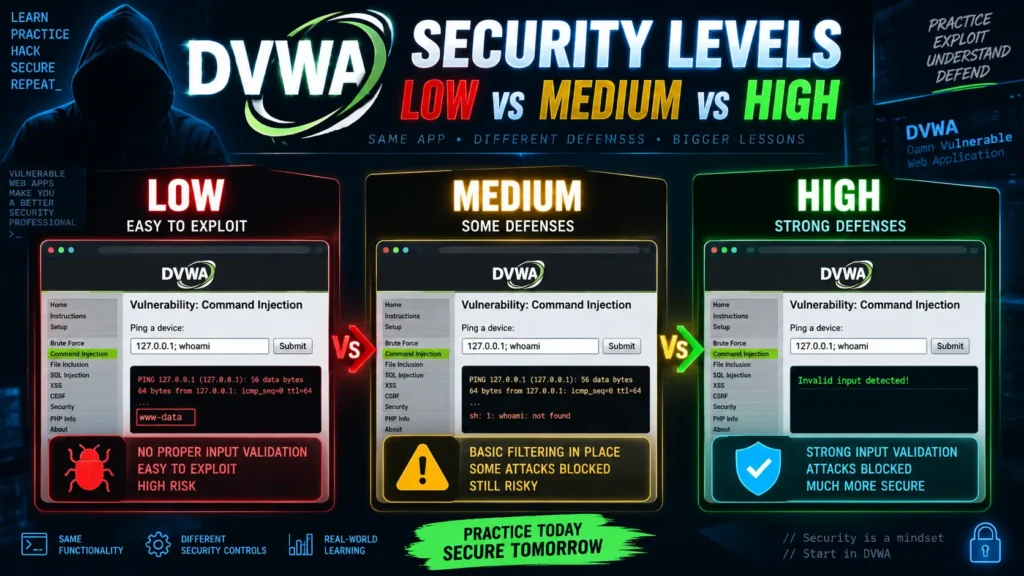
DVWA uses four security levels—Low, Medium, High, and Impossible—to show how the same type of web vulnerability can behave differently as security controls become stronger.
This is one of the most useful features of the Damn Vulnerable Web Application (DVWA). Instead of showing a vulnerability only once, DVWA lets learners compare weak code, partial protections, stronger defenses, and an implementation intended to prevent the vulnerability.
The four valid DVWA security levels in the current source are:
- Low
- Medium
- High
- Impossible
The current DVWA source explicitly recognizes those four values, and its configuration currently sets Impossible as the default security level for a new session unless the administrator changes that setting.
Understanding these levels is important because they are not simply four labels for “easy, normal, hard, and very hard.” Each DVWA vulnerability can load different PHP source code and use different validation, request handling, authentication checks, tokens, session behavior, or defensive techniques depending on the selected level.
This guide explains DVWA Low vs Medium vs High vs Impossible, what changes between the levels, which level beginners should start with, how to change the security level, and how to use the differences to learn secure web development.
Important: DVWA is deliberately vulnerable. Use it only in a local or isolated environment that you own or have permission to test. The official project warns against putting DVWA on an Internet-facing server.
DVWA Security Levels: Quick Answer
The easiest way to understand the four DVWA security levels is to think of them as stages of defensive improvement.
| DVWA level | General purpose | What the learner sees |
|---|---|---|
| Low | Demonstrate the basic vulnerability | Little or weak protection |
| Medium | Introduce basic defensive measures | Some simple attacks become harder |
| High | Add stronger restrictions | More careful analysis is required |
| Impossible | Demonstrate the intended secure implementation | Root cause is addressed more directly |
The important word here is general.
DVWA does not apply one identical rule to every vulnerability. SQL Injection, CSRF, File Upload, XSS, Command Injection, and other labs each have their own source files and can implement the four levels differently. Current DVWA code loads separate low.php, medium.php, high.php, and impossible.php implementations for many labs.
What Are DVWA Security Levels?
DVWA security levels control how much protection is applied to individual vulnerability exercises.
When you select a level, DVWA uses that choice to decide which version of the vulnerability code should run.
For example, the current SQL Injection lab checks the active security level and loads one of four different files:
low.php
medium.php
high.php
impossible.php
The lab even changes parts of its user interface and request behavior between levels. For example, the current Medium SQL Injection level uses a POST-based selection interface, while other levels can use different input flows.
This means DVWA security levels are not just cosmetic.
They can change the actual server-side logic.
Why Does DVWA Have Four Security Levels?
The security levels make DVWA useful for more than simply demonstrating that a vulnerability exists.
Imagine learning SQL injection from only one badly written database query. You might understand the basic problem, but you would not necessarily understand why some attempted fixes are incomplete or why stronger coding practices work better.
DVWA lets you compare those stages.
At Low, the weakness is usually easier to recognize.
At Medium, some protection appears.
At High, the application may make the weakness more difficult to reach or abuse.
At Impossible, the source code is generally designed to show the defensive approach that should prevent the exercise’s intended vulnerability.
This progression encourages learners to ask a better question than:
“How do I complete the challenge?”
The more valuable question is:
“What changed in the code, and why does that change improve security?”
That is where DVWA becomes useful for developers as well as security learners.
Important: DVWA Levels Are Not a Universal Difficulty Score
A common misunderstanding is that Low, Medium, High, and Impossible represent a fixed technical difficulty scale that behaves identically in every module.
They do not.
DVWA chooses different source code based on the security level of each vulnerability. The project even provides functionality for viewing all four source implementations side by side for many labs.
That means:
Low SQL Injection may differ from Medium SQL Injection in one way, while Low CSRF and Medium CSRF may use a completely different type of defensive change.
So when comparing levels, focus on the specific lab and its code rather than assuming “Medium always adds the same filter.”
DVWA Low Security Level
What Is DVWA Low Security?
Low is the most deliberately vulnerable DVWA security level.
It is normally designed to make the underlying weakness easy to observe.
At this level, the application may contain little input validation, weak or missing security checks, direct use of user-controlled data, weak session behavior, or insecure application logic.
The goal is educational clarity.
A beginner should be able to see the relationship between user input and insecure application behavior without first bypassing several defensive layers.
What Should You Learn at Low Security?
Low is best used to understand the root cause of a vulnerability.
When studying a Low-level challenge, focus on questions such as:
- Where does the user’s input enter the application?
- What does the application do with that input?
- Is input validated before use?
- Is output encoded before being displayed?
- Is a database query safely parameterized?
- Does the application verify authorization?
- Is a sensitive action protected against unwanted requests?
- Does the application trust information it should not trust?
These questions are more useful than memorizing a particular input string.
Is Low the Best Level for Beginners?
Usually, yes.
If you are new to web application security, starting at High can make a vulnerability appear confusing because you are trying to understand both the original weakness and additional defensive logic at the same time.
Low lets you study the core problem first.
Once you understand why the weakness exists, Medium and High become much easier to analyze.
DVWA Medium Security Level
What Is DVWA Medium Security?
Medium introduces additional protection but may still leave the underlying vulnerability reachable.
The exact protection depends on the DVWA module.
The application may introduce:
- Basic input filtering
- Different request methods
- Restricted input choices
- Additional validation
- Simple browser-related checks
- Sanitization attempts
Medium is particularly useful because it demonstrates an important real-world lesson:
A security control can make an attack harder without actually fixing the underlying design problem.
Why Medium Is Important for Developers
Many insecure real applications do not completely ignore security.
Instead, developers may add a filter, blacklist, front-end restriction, or other partial defense and assume the vulnerability has been solved.
Medium-level DVWA challenges help learners examine that type of situation.
The right question becomes:
“Is this defense addressing the root cause, or is it only blocking one obvious path?”
That mindset is important in secure application development.
Example of a Medium-Level Change
The current DVWA SQL Injection interface provides a good example of how a level can change application behavior.
At Medium, the SQL Injection page uses a POST request and presents the user with a selection field rather than the same free-form interface used at some other levels.
This teaches an important concept:
Changing what the browser interface allows does not automatically guarantee that the server-side code is secure.
Server-side validation and safe database handling remain essential.
DVWA High Security Level
What Is DVWA High Security?
High adds stronger obstacles and usually requires a better understanding of the application before the weakness can be studied successfully.
At this stage, the learner should already understand the vulnerability itself.
The purpose is no longer simply identifying that a weakness exists. Instead, High encourages you to examine:
- Application workflow
- Validation logic
- Session state
- Input restrictions
- Request structure
- Browser behavior
- Server-side assumptions
High is therefore more useful after Low and Medium have already been studied.
Does High Mean the Application Is Secure?
No.
This is one of the most important distinctions in DVWA.
The name High means the challenge has stronger defenses than lower levels. It does not necessarily mean the underlying vulnerability has been fully eliminated.
That role is more closely represented by the Impossible implementation.
Think of High as:
“More difficult because stronger controls exist.”
not:
“Secure enough for a production website.”
Why High Can Be More Educational Than Low
Low teaches the vulnerability.
High teaches you to analyze how applications try to defend against the vulnerability.
That difference matters.
When you study the source code at High, ask:
- Which checks were added?
- Which inputs changed?
- Is the defense happening in the browser or server?
- Is the defense based on a blacklist or a safer design?
- Does it remove the root cause?
- What additional security principle would improve it?
These questions turn DVWA from a challenge environment into a secure-coding lesson.
DVWA Impossible Security Level
What Is DVWA Impossible Security?
Impossible is intended to demonstrate a secure implementation for the specific exercise.
Instead of merely making the vulnerability difficult to use, Impossible generally introduces controls designed to remove or properly mitigate the root cause.
Depending on the module, these protections can include concepts such as:
- Prepared database statements
- Stronger type validation
- Anti-CSRF tokens
- Verification of the user’s current credentials
- Improved session handling
- Better cookie settings
- Safer application logic
However, “Impossible” should be understood in the context of the DVWA exercise. The DVWA project itself says the application contains both intentional and unintentional vulnerabilities, so the label should not be interpreted as a guarantee that the entire application is mathematically or universally secure. (github.com)
A better interpretation is:
Impossible represents the intended secure implementation of that DVWA challenge.
What Makes Impossible Different?
The difference between High and Impossible is not simply that Impossible adds “more filtering.”
In well-designed security code, the better solution often changes the approach entirely.
For example, instead of trying to remove suspicious characters from database input, a secure application can separate the SQL query structure from the user-supplied data through parameterized statements.
Instead of trying to guess whether a password-change request came from the correct page, the application can require a valid anti-CSRF token and verify the user’s current password.
These are stronger approaches because they address the security model rather than only adding obstacles.
SQL Injection: How the Levels Differ
SQL Injection is one of the clearest examples of why DVWA security levels are useful.
The current DVWA SQL Injection module loads separate source code for all four security levels.
At the lower levels, the exercise demonstrates unsafe ways of handling database input.
The interface and input handling become more restrictive through Medium and High.
At Impossible, the current implementation performs numeric validation and uses a prepared database statement with a bound integer parameter. It also includes an anti-CSRF token in the form.
This is an important security lesson.
The strongest defense is not simply:
“Block suspicious-looking input.”
It is:
“Use the database safely so user data is treated as data rather than query structure.”
That is a much more reliable design principle.
CSRF: How Impossible Changes the Security Model
The CSRF lab shows another useful progression.
At the Impossible level, the current DVWA implementation checks an anti-CSRF token and also asks for the user’s current password before allowing the password change operation.
This demonstrates defense in depth.
The application does not rely on only one signal.
It verifies that the request contains a valid token associated with the user’s session and confirms sensitive account information before completing the action.
For developers, this illustrates why sensitive operations should have strong server-side checks instead of trusting that a request came from the expected page.
Security Levels Also Affect DVWA Sessions and Cookies
One content detail that is easy to miss is that DVWA’s security level can affect more than the individual vulnerability’s PHP file.
The current DVWA session code treats the Impossible security level differently.
At Impossible, DVWA sets the session cookie with:
HttpOnlySameSite=Strict
It also regenerates the session ID. At lower security levels, those protections are intentionally relaxed so certain session-related weaknesses can remain available for learning.
This is a valuable example because it demonstrates that application security involves more than input validation.
Cookie attributes and session lifecycle management are also part of a secure web application.
Low vs Medium vs High vs Impossible: Detailed Comparison
| Area | Low | Medium | High | Impossible |
|---|---|---|---|---|
| Learning purpose | Show basic weakness | Introduce basic defenses | Add stronger restrictions | Demonstrate intended secure design |
| Input handling | Minimal protection | Some filtering/restriction | More defensive handling | Strong validation appropriate to lab |
| Difficulty | Beginner-friendly | Intermediate | More challenging | Usually intended not to be vulnerable in the same way |
| Source code | Intentionally weak | Partially improved | Stronger controls | Defensive implementation |
| Best use | Learn root cause | Study incomplete defenses | Analyze stronger controls | Learn secure coding |
| Recommended order | First | Second | Third | Last |
| Production example? | No | No | No | Educational secure reference only |
The exact changes vary from one DVWA module to another, so this table should be treated as a learning model rather than a strict technical rule for every challenge.
Which DVWA Security Level Is the Default?
This is an area where older tutorials can be misleading.
The current distributed DVWA configuration defaults to impossible for each new session unless the setting is changed.
The relevant configuration is:
$_DVWA[ 'default_security_level' ] =
    getenv('DEFAULT_SECURITY_LEVEL') ?: 'impossible';
Older DVWA guides may tell you the default is Low because older copies or configurations used different values.
For current installations, check your actual configuration rather than relying on an old tutorial.
Why Does My New DVWA Installation Start at Impossible?
If you install current DVWA and expect to see Low but the interface shows Impossible, your installation is probably behaving normally.
The current configuration template explicitly defines:
impossible
as the default security level.
You can manually switch to Low from the DVWA Security page when you are ready to begin a vulnerability exercise.
This is actually a sensible default because an intentionally vulnerable application does not need to begin every session with its weakest configuration.
How to Change the DVWA Security Level
After logging into DVWA, open the:
DVWA Security
page from the application menu.
Choose one of the supported levels:
- Low
- Medium
- High
- Impossible
Save or submit your selection.
DVWA stores and reads the active security level as part of its application state. The current source validates the selected level against the four supported values.
Once the level changes, return to the vulnerability you are studying.
The application will use the implementation associated with the new level.
How to Check Your Current DVWA Security Level
DVWA displays the current security level in its interface.
If you are unsure which level you are using, check the status area before beginning a lab.
This is important because the same vulnerability page can behave very differently after the security setting changes.
If a tutorial appears not to match what you see on your screen, confirm the security level before assuming the tutorial or installation is broken.
How to Change the Default Security Level
You can change the default security level in the DVWA configuration.
The supported values are:
low
medium
high
impossible
For example:
$_DVWA[ 'default_security_level' ] = 'low';
The official README specifically shows low as an example when explaining how administrators can configure the application for testing tools that require a particular level.
For most learners, however, changing the level through the DVWA interface is simpler.
How to Set the Default DVWA Level in Docker
DVWA supports environment variables, which is useful when the application runs through Docker or Kubernetes.
The official documentation gives an example using:
environment:
  - DB_SERVER=db
  - DEFAULT_SECURITY_LEVEL=low
This allows the default security setting to be changed without rebuilding the Docker image.
After changing Docker Compose settings, recreate or restart the application environment so the new configuration takes effect.
Why Does DVWA Use a Security Cookie?
The current DVWA source keeps track of the chosen security level using a security cookie and validates the value against:
low
medium
high
impossible
If there is no valid security cookie, DVWA falls back to the configured default level.
This explains why changing levels affects your current browser session.
It also explains why resetting browser cookies can sometimes cause DVWA to return to its configured default level.
What Should Beginners Learn at Each Level?
The best way to use DVWA is not to remain at Low until every challenge is complete.
Use the levels as a learning sequence.
Low: Understand the Vulnerability
Your goal should be to understand:
- What input is controlled by the user
- Where the input goes
- Why the application trusts it
- What secure principle is missing
Do not rush ahead until the root cause makes sense.
Medium: Understand Weak Defenses
At Medium, ask:
- What defense was added?
- Is the defense server-side?
- Does it fix the vulnerability or only reduce obvious abuse?
- What assumption is the developer making?
This stage teaches why “some security” is not always sufficient security.
High: Understand Application Logic
At High, study how the complete request flows through the application.
Pay attention to the relationship between:
- Browser
- Form
- HTTP request
- Session
- Server-side validation
- Database or filesystem
- Application state
High is often more about understanding the application than simply understanding one input field.
Impossible: Understand the Correct Defense
At Impossible, spend more time reading the source code than trying to break the page.
Ask:
- Which vulnerable operation was replaced?
- What server-side checks were added?
- Is a prepared statement being used?
- Is authorization verified?
- Is a token required?
- Does the application verify sensitive user information?
- Are session protections stronger?
This is the level that converts offensive-security knowledge into defensive-development knowledge.
Best DVWA Learning Order
For most beginners, the most useful progression is:
Low
↓
Understand the vulnerability
↓
Medium
↓
Study partial defenses
↓
High
↓
Analyze stronger controls
↓
Impossible
↓
Study the secure implementation
Do not treat this as a race.
If you cannot explain why the Low-level code is vulnerable, moving directly to High usually creates more confusion rather than more learning.
Should You Start Every Vulnerability at Low?
For beginners, usually yes.
Low gives you a clear baseline.
Once you understand the baseline, the differences at Medium and High become meaningful.
More experienced learners may choose to start at another level when they are specifically practicing source-code review or testing a tool, but that is a different learning objective.
Is Impossible Always Completely Secure?
Not necessarily in the broadest possible sense.
“Impossible” means the DVWA exercise is designed to demonstrate the secure implementation for that particular vulnerability.
The DVWA project’s own security notice says that DVWA contains both intentional and unintentional vulnerabilities. (github.com)
That is why you should avoid describing Impossible as:
“100% secure code.”
A more accurate description is:
Impossible is DVWA’s intended secure implementation of the specific challenge.
That wording is both technically safer and more useful to learners.
Does Medium Always Mean Filtering?
No.
Different DVWA modules implement their security levels differently.
A Medium-level challenge might change:
- Input validation
- HTTP method
- Form controls
- Request processing
- Output handling
- Authentication logic
- Application assumptions
This is why reading the actual source code is more valuable than memorizing generic descriptions of Low, Medium, and High.
Are DVWA Security Levels the Same Across Every Module?
No.
Each module can select separate source files for the current level.
DVWA’s source viewer can load low.php, medium.php, high.php, and impossible.php for many different vulnerability categories, including SQL Injection, CSRF, Command Injection, File Upload, Reflected XSS, Stored XSS, Weak Session IDs, Authorization Bypass, and others.
So you should analyze the levels per vulnerability, not as one universal configuration.
How to Compare DVWA Source Code Between Levels
One of the best ways to learn from DVWA is to compare the code directly.
When a challenge offers source viewing, examine the Low version first.
Then compare it with Medium, High, and Impossible.
Instead of reading every line equally, focus on what changed.
For example, look for changes involving:
- How user input is retrieved
- How values are validated
- How database queries are constructed
- Whether output is encoded
- Whether tokens are checked
- Whether authentication or authorization is verified
- Whether the application trusts browser-supplied information
- Whether session behavior changes
DVWA itself includes functionality for displaying all four source versions for many modules, making this comparison part of the intended learning experience.
What Security Concepts Can the Levels Teach?
The security-level system can help learners understand several important development principles.
Input Validation
Applications should validate input according to what the data is supposed to represent.
Output Encoding
Untrusted data should be safely encoded before it is placed into HTML or another output context.
Parameterized Queries
Database data should be separated from SQL query structure.
CSRF Protection
Sensitive actions should verify that a request came from an authorized user interaction.
Authentication
An application should verify who the user is before allowing sensitive operations.
Authorization
Being logged in does not automatically mean a user should have access to every action or resource.
Session Security
Session IDs and cookies must be handled carefully because they represent authenticated users.
Defense in Depth
A strong application often uses multiple complementary controls rather than depending on a single filter.
DVWA’s level system is valuable because learners can see several of these ideas appear gradually in working PHP code.
Low vs Impossible: The Most Useful Comparison
If you have limited time, comparing Low directly with Impossible is extremely educational.
Low usually shows what happens when the application trusts user input too easily.
Impossible shows the defensive approach DVWA intends to demonstrate.
The difference reveals two things at once:
What created the vulnerability
and
What secure coding principle removes or mitigates it
For developers, that comparison may be more valuable than completing every intermediate challenge.
Medium vs High: Why Compare Them?
Medium and High are useful because real applications are often somewhere between obviously vulnerable and correctly secured.
Developers frequently add protections over time.
Some controls improve security but still leave architectural weaknesses.
By comparing Medium and High, you can practice answering:
“What protection was added, and what risk still remains?”
That is a useful skill for both code review and application security assessment.
DVWA Security Levels and Testing Tools
Security testing tools can behave differently depending on the selected DVWA level.
A tool that easily identifies a problem at Low may produce different results at Medium, High, or Impossible because the application’s requests, responses, validation, or authentication behavior changed.
This makes DVWA useful for understanding why automated scanners should not be treated as a replacement for understanding application logic.
The official project even allows authentication to be disabled and the default security level to be configured when working with tools that do not handle DVWA’s login or cookies conveniently.
Common Mistakes When Using DVWA Security Levels
Treating High as Production-Secure
High is still part of an intentionally vulnerable training application.
Use Impossible to study the exercise’s intended secure implementation.
Staying on Low Forever
Low is excellent for learning fundamentals, but it does not teach enough about defensive controls by itself.
Move through the other levels once you understand the vulnerability.
Copying Answers Without Reading the Code
DVWA becomes much less useful if the only objective is entering a known string and seeing a challenge work.
The real educational value comes from comparing application behavior and source code.
Assuming the Same Defense Appears Everywhere
Each vulnerability can implement the security levels differently.
Always inspect the specific module.
Using an Old Tutorial Without Checking the Level
A guide written for Low may not match what you see on High or Impossible.
The current DVWA configuration also defaults to Impossible, which means old tutorials assuming Low can be confusing.
DVWA Security Level Troubleshooting
Security Level Keeps Returning to Impossible
The current configuration defaults new sessions to:
impossible
If your level resets after cookies or session data are cleared, check:
config/config.inc.php
and look at the configured default security level.
Tutorial Does Not Match My DVWA Screen
First verify which security level the tutorial uses.
Then check your current DVWA level.
Different levels can change the interface, request method, and source code.
Changing the Level Does Not Seem to Work
Confirm that you saved the setting and that your browser accepts DVWA cookies.
The current application reads the active security level from the security cookie and validates it against the supported values.
Docker Always Starts at the Wrong Level
Set the environment variable in your Docker Compose configuration.
For example:
environment:
  - DEFAULT_SECURITY_LEVEL=low
The official README documents this configuration method.
DVWA Security Levels Checklist
When studying a vulnerability, use this simple process:
- Start at Low.
- Understand the root cause.
- Read the Low source code.
- Move to Medium.
- Identify what protection changed.
- Move to High.
- Analyze stronger controls and application logic.
- Move to Impossible.
- Compare the secure implementation with Low.
- Write down the defensive principle you learned.
This approach turns each DVWA lab into a secure-coding lesson rather than just a challenge.
Frequently Asked Questions
What are the four DVWA security levels?
DVWA supports four security levels:
Low, Medium, High, and Impossible.
The current source validates exactly those four values.
What is DVWA Low security?
Low is the intentionally weak starting level. It generally provides minimal protection so learners can understand the root cause of a vulnerability more easily.
What is DVWA Medium security?
Medium introduces additional restrictions or defensive measures but may still leave the exercise’s intended weakness accessible.
Its purpose is to show how partial defenses can change vulnerability behavior.
What is DVWA High security?
High introduces stronger defensive controls and usually requires a better understanding of the application’s logic and request flow.
High should not automatically be treated as production-secure code.
What is DVWA Impossible security?
Impossible is intended to demonstrate DVWA’s secure implementation for the particular vulnerability.
Depending on the exercise, it can use techniques such as prepared database statements, tokens, stronger validation, credential verification, or improved session handling.
Which DVWA security level should beginners use?
Beginners should generally start with Low, understand the vulnerability, and then move through Medium, High, and Impossible.
That order makes it easier to understand why each new defensive control matters.
Is Low the default DVWA security level?
Not in the current distributed configuration.
Current DVWA defaults new sessions to:
impossible
unless the administrator changes the setting.
Why does my DVWA start at Impossible?
Because the current default configuration sets the default security level to Impossible.
You can switch to Low from the DVWA Security page or modify the configured default.
Is Impossible completely secure?
Impossible is intended to represent the secure implementation of the specific DVWA exercise, but DVWA itself remains an intentionally vulnerable training application and can contain other intentional or unintentional weaknesses.
Does changing the DVWA level change the source code?
DVWA does not rewrite the files, but many vulnerability pages select a different PHP source implementation based on the active security level.
For example, many modules have separate:
low.php
medium.php
high.php
impossible.php
files.
Does DVWA Impossible use prepared statements?
In the current SQL Injection Impossible implementation, DVWA uses a prepared statement with a bound integer parameter rather than constructing the SQL query from raw user input.
Does Impossible improve session security?
Yes.
Current DVWA code applies HttpOnly and SameSite=Strict to its session cookie at Impossible and regenerates the session identifier. Those protections are intentionally relaxed at lower levels for educational purposes.
How do I change the DVWA security level?
Log into DVWA, open DVWA Security, select Low, Medium, High, or Impossible, and save the setting.
Can I change the default DVWA security level?
Yes.
You can change:
$_DVWA[ 'default_security_level' ]
in the DVWA configuration or use the DEFAULT_SECURITY_LEVEL environment variable in a container deployment.
What is the best DVWA level for learning secure coding?
Impossible is especially useful for secure-coding study because it lets you compare the intentionally vulnerable lower-level code with the defensive implementation.
However, you will understand Impossible better if you study Low first.
Final Thoughts
The four DVWA security levels—Low, Medium, High, and Impossible—are one of the main reasons DVWA remains useful for web application security education.
Low shows the weakness clearly.
Medium demonstrates how simple security controls change the application’s behavior.
High introduces stronger defenses and forces you to understand the application more deeply.
Impossible demonstrates the implementation DVWA intends to use to prevent the specific vulnerability.
The most effective learning process is therefore not:
Find vulnerability
↓
Complete challenge
↓
Move on
A better process is:
Understand the vulnerable code
↓
Compare Low and Medium
↓
Study stronger controls at High
↓
Read Impossible
↓
Understand the secure design principle
That approach teaches both sides of application security.
You learn why web vulnerabilities happen, but you also learn how developers can prevent them.
One final detail is worth remembering: current DVWA starts new sessions at Impossible by default, so if a tutorial shows much weaker behavior than your installation, check your active security level before assuming something is broken.
And regardless of which level you select, DVWA remains an intentionally vulnerable training application. Keep it inside a controlled local environment and use it only on systems you own or have authorization to test.